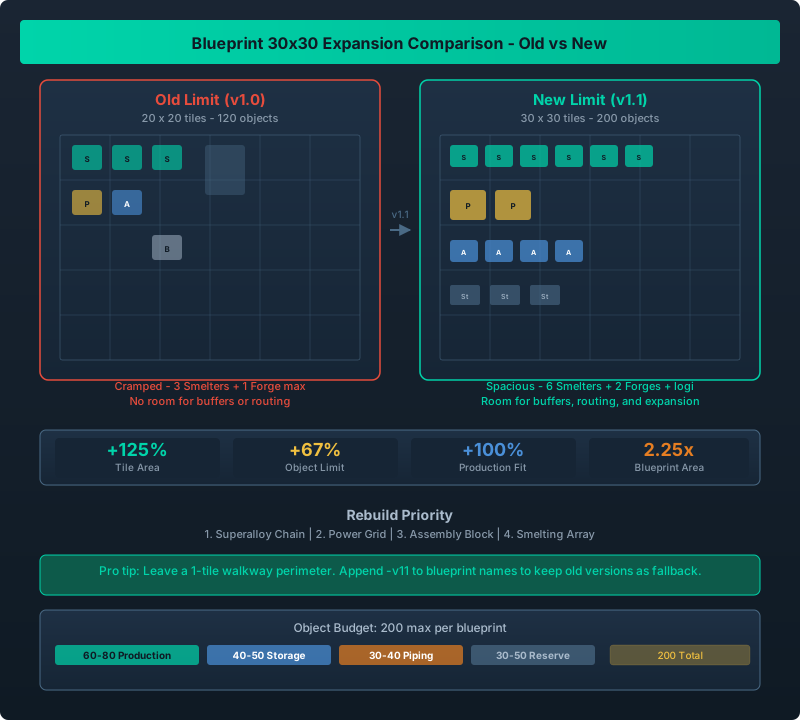
Comparison between old 20x20 blueprint area and new 30x30 area, showing how much more production fits in a single blueprint
Your Old Blueprints Are Wasting Space. Here is How to Fix Them
Before v1.1, blueprints were limited to 20x20 tiles and 120 objects. This meant your Superalloy line needed two blueprints. Your power grid had to be split into solar and battery blueprints. And any attempt to build a complete production chain from raw ore to finished product in one blueprint was impossible.
v1.1 expanded the limit to 30x30 tiles and 200 objects. That is 2.25x the surface area and 1.67x the objects. I spent an evening rebuilding every blueprint I had, and the results were dramatic: my compacted Superalloy blueprint went from 3 builds to 1.
If you are new to blueprints entirely, our Blueprint and Layout Guide covers the basics of creating and using them.
The new limits (30x30 tiles, 200 objects) let you fit a complete production chain in a single blueprint. Prioritize rebuilding your Superalloy chain, power grid, and assembly lines. One 30x30 blueprint handles roughly 2.5x the production of a 20x20 design. Update your existing blueprints by loading them, expanding the selection box, and adding modules in the new space.
New Limits Explained
| Metric | Old Limit | New Limit | Improvement |
|---|---|---|---|
| Width | 20 tiles | 30 tiles | +50% |
| Height | 20 tiles | 30 tiles | +50% |
| Total area | 400 tiles | 900 tiles | +125% |
| Max objects | 120 | 200 | +67% |
| Ideal production fit | 1-2 Mk 1 buildings | 2-3 Mk 2 buildings | +100%+ |
The 30x30 box fits roughly 2.25 Superalloy forges with their supporting infrastructure. Before, you could barely squeeze in 1 forge plus buffers.
| Blueprint Type | Old Fit | New Fit | Improvement |
|---|---|---|---|
| Superalloy line | 1 Forge + prefilters | 2 Forges + full chain | +100% |
| Assembly block | 2 Fabricators | 4 Fabricators + logi | +100% |
| Solar array | 16 panels | 30 panels + battery | +88% |
| Smelting block | 3 Smelters | 6 Smelters + buffer | +100% |
How to Expand Your Existing Blueprints
| Step | Action | Details |
|---|---|---|
| 1 | Load the old blueprint | Press B, go to Blueprints tab, select your old 20x20 design |
| 2 | Place it in build mode | Click to ghost-place it on an empty area of your station |
| 3 | Select Expand in the build interface | A new selection box appears at the old 20x20 boundaries |
| 4 | Drag the corners out | The selection box now allows up to 30x30. Drag any corner outward. |
| 5 | Add new modules in the extra space | Place additional buildings, storage, or logistics in the expanded zone |
| 6 | Save as a new blueprint | Press Ctrl+S (or the save button) to overwrite or save as a new name |
Name convention: I append -v11 to my expanded blueprints so I can keep the old version as a fallback. Example: superalloy-v1 becomes superalloy-v11.
Quick win tip: The simplest upgrade is adding buffer storage. Old blueprints had no room for buffers. The new 30x30 area lets you drop 2-4 storage containers between production stages. This smooths out supply gaps and prevents line stalling.
Best Blueprints to Rebuild for v1.1
Not every blueprint needs expansion. Here is my priority list:
First Priority: Superalloy Production Chain
The old 20x20 could fit one Plasma Forge, one Smelter, and maybe a single buffer. The new 30x30 fits two Forges, two Smelters, three buffers, and a priority splitter.
Design tip: Arrange the two forges in parallel with a shared input buffer. Input buffer feeds both forges equally. Each forge outputs to its own buffer. Use a priority merger to combine outputs. This gives you roughly 36-40 Superalloy/min from a single blueprint.
Second Priority: Power Grid Blueprint
Old: 16 solar panels and 4 batteries. New: 30 solar panels, 6 batteries, and a logic controller for smart load balancing. The extra 10 panels cover roughly 40% more power demand – enough to run a full Mk 2 production line.
Third Priority: Assembly Line Block
The 200-object limit really shines here. With 80 extra objects, you can fit:
- 4 Fabricators (was 2)
- 6 Storage containers for input/output buffering (was 3)
- 2 Logistics Hubs for cross-block distribution (was 0)
- Routing infrastructure for all connections
For assembly line ratios, see our Assembly Line Ratios Guide.
Fourth Priority: Smelting Array
| Tier | Old Fit (20x20) | New Fit (30x30) |
|---|---|---|
| Mk 1 Smelters | 3 Smelters | 6 Smelters |
| Mk 2 Smelters | 1 Smelter + buffer | 3 Smelters + shared buffer |
| Mk 3 Smelters | 0 (too big) | 1 Smelter + full support |
A 30x30 Smelting blueprint with Mk 2 Smelters handles roughly 90 ingots/min. That is enough to supply a mid-game factory entirely from one blueprint.
Our Mk 2 and Mk 3 Factory Guide covers which upgrades pay off fastest.
Blueprint Tips for the New Limits
Leave walkways. The 30x30 area is tempting to fill completely. Do not. Leave a 1-tile walkway perimeter around your blueprint. The game does not require physical access for maintenance, but leaving space makes it easier to see connections and troubleshoot bottlenecks.
Use the full height. Old blueprints tended to be wide and shallow because 20 tiles was restrictive. Now you can build tall – stack production vertically with storage on top and smelting below. The engine handles Z-axis stacking differently based on station gravity orientation.
Object count awareness. 200 objects sounds generous but fills fast. Each storage container is 1 object. Each building is 1 object. Each logistics pair connection takes 0 objects (it is virtual). Your object budget for a dense production block should be roughly:
- Production buildings: 60-80 objects
- Storage/Infrastructure: 40-50 objects
- Connectors/piping: 30-40 objects
- Reserve: 30-50 objects for expansion
What Has Not Changed
The 20x20 blueprints still work. The game does not invalidate old blueprints. You can place a 20x20 blueprint inside the new 30x30 area just fine. The old limits only affect new blueprint creation.
Blueprint sharing between players is unaffected – the new 30x30 blueprints load fine in co-op provided all players are on v1.1+. If you send a 30x30 blueprint to a v1.0 player, it will error with a version mismatch.
Limits confirmed against Steam patch notes for v1.1. Blueprint placements tested on v1.1.1.0. Object counts verified on builds exceeding 120 objects. Official patch notes: Steam News v1.1.