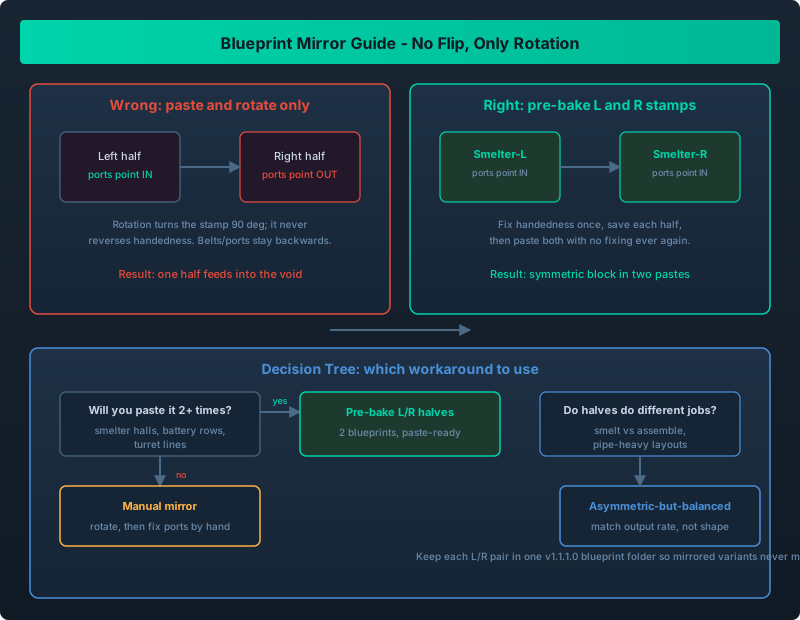
Rotation-only blueprints force symmetric builds to be mirrored by hand; three workarounds and when to use each
You Built Half A Base And Then Hit A Wall
You spend an hour laying out a clean smelter hall: four furnaces, symmetric feed lines, tidy output belts down the middle. Now you want the same thing on the other side of your station, flipped so the ports face the shared bus. You copy the blueprint, look for the flip button, and there is not one. Outworld Station blueprints rotate in 90-degree steps - that is the entire transform menu.
This is one of the most repeated complaints in Steam discussions, and it is worth being blunt: the game does not treat a blueprint as a flippable stamp. Once you accept that, you can plan around it instead of fighting it.
Blueprints support rotation only. There is no mirror or flip. To build symmetric stations you either mirror the second half by hand using rotation plus copy, design deliberately asymmetric-but-balanced layouts, or pre-bake mirrored halves as two separate blueprints so each is a paste-ready stamp. Decide per build using the table below, and keep the mirrored pair together in a v1.1.1.0 blueprint folder.
What The Blueprint System Does And Does Not Do
Know exactly where the ceiling is, because much of the frustration comes from assuming a feature that never existed.
| Operation | Supported? | Notes |
|---|---|---|
| Capture a region as a blueprint | Yes | Up to 30x30 tiles and 200 objects in v1.1 |
| Rotate in 90-degree steps | Yes | The only transform available |
| Mirror / flip horizontally | No | No button, no hotkey, no modifier |
| Save multiple blueprint variants | Yes | Folders and renaming added in v1.1.1.0 |
| Auto-connect pipes and belts on paste | No | Connections are manual after every paste |
The area limits matter here. If you are still on older 20x20 blueprints, read the Blueprint Expansion Guide first, because the 30x30 limit is exactly what makes the pre-baked-halves trick practical.
Why Rotation-Only Actually Hurts
Rotation and mirroring are not the same thing, and the difference shows up the moment your design is not rotationally symmetric.
A conveyor that runs left-to-right into a smelter will not become a right-to-left feeder just because you rotate the stamp 90 degrees. Rotation turns the layout, ports and all, around a corner. It never reverses handedness. So the input stays on the left relative to the building, just facing a new compass direction. If your halves need to be chiral twins - the same shape reflected - you cannot get there with rotation alone.
That is why symmetric stations built from one blueprint end up with one side feeding correctly and the other feeding backwards.
Workaround 1: Build One Side, Then Mirror It By Hand
This is the honest manual path most players end up taking.
- Build and finalize the first half exactly as you want it.
- Paste a copy of that blueprint where the mirrored half belongs.
- Rotate the pasted copy so its overall footprint matches the target orientation.
- Fix the handedness yourself, object by object: flip belt direction, re-run pipes to the correct ports, and move any asymmetric machines to the mirrored position.
- Save the corrected second half as its own blueprint so you never repeat the work.
The advantage is precision; the disadvantage is time, and it gets worse the more fluid ports your design has.
Workaround 2: Design Asymmetric-But-Balanced
If you stop chasing perfect symmetry, the problem mostly disappears. Two production blocks can have equal throughput with completely different internal shapes, as long as their inputs and outputs meet in the middle.
Use this when the two halves serve different roles anyway. A left block that smelts and a right block that assembles does not need to be a mirror image - it needs to be balanced. The technique is the same one used for conveyor balancing: make the output rates match, not the geometry.
This is also the smarter default when your station grows irregularly, as covered in the Station Layout Guide.
Workaround 3: Pre-Bake Mirrored Halves As Separate Blueprints
This is the workaround that the v1.1 30x30 limit unlocked. Instead of one symmetric blueprint, you build two chiral halves and save each as its own stamp.
- Build the left half and save it as
30x30 Smelter-L. - Build the right half, correcting handedness once, and save it as
30x30 Smelter-R. - On a new planet or a new wing, paste
-Land-Rside by side with no rotation and no fixing.
It costs one blueprint slot and one extra build pass up front; after that, placing a symmetric block is two pastes and a connection pass. For anything you will build more than twice - smelter halls, battery rows, turret lines - this is the clear winner. The Multi-Planet Expansion Guide assumes exactly this kind of paste-ready catalog.
The 200-object ceiling applies per blueprint, not per half, so a pair gives you effectively 400 objects of coverage. Pasting still does not auto-connect anything, so budget time for the pipe and belt pass.
Which Approach To Use
| Situation | Best approach | Why |
|---|---|---|
| One-off decorative or storage block | Manual mirror (rotation + fix) | Not worth a second blueprint slot |
| Block you will build 2+ times | Pre-baked L/R halves | Paste-ready, no fixing after the first time |
| Two halves with different functions | Asymmetric-but-balanced | Mirroring adds no value if roles differ |
| Pipe-heavy or fluid layout | Asymmetric-by-design or rework the piping | Hand-mirroring fluid ports is the worst case |
| Ship or single large hull | Manual mirror | Rarely repeated, and ships are usually asymmetric |
The rule of thumb: paste it more than twice, split it into halves. One-off, grind through the manual mirror and move on.
Keeping Mirrored Variants Organized
Once you have -L and -R pairs plus a few angle variants, a flat blueprint list becomes unusable. This is exactly what the v1.1.1.0 blueprint folders solve: one folder per pair, both renamed with the same stem plus suffix.
The Blueprint Folder Management Guide walks through the workflow.
Advanced blueprint tricks build on the same paste-ready catalog idea.
There is no mirror button and none you can rely on, so stop designing in mirrored pairs. Either build the second half by hand from a rotated copy, or - better for anything repeatable - pre-bake an -L and -R pair and keep them in one folder. Plan the handedness before you place the first building and you save hours of port-fixing later.