Your Connectors Stop Working 20 Tiles Away and Nothing Explains Why
You placed a Connector between your smelter room and the storage area. It works perfectly for the first 15 tiles. Then you extend the line to reach the far end of storage and suddenly the items stop moving. The Connector is still powered. The lights are on. But nothing is flowing.
Every Connector in Outworld Station has a maximum link range. Exceed it and the connection breaks silently —no error message, no warning light. Your assemblers starve while the Connector sits there looking functional but not actually moving anything.
The Short Version
Connectors have a 15-tile max range. Place a Relay building every 12-14 tiles to chain the link further. The Relay counts as a signal booster —it receives from one Connector and transmits to the next. Items hop from relay to relay, so a 50-tile run needs 3-4 relays spaced evenly. Drone links do not have this range limit, only Connectors do.
Connector Range Limits (Complete Reference)▼/span>
Base Range by Connector Type
| Connector Type | Max Range (tiles) | Throughput | Best Use |
|---|---|---|---|
| Basic Connector | 15 | 12 items/min | Short runs within same room |
| Heavy Connector | 20 | 30 items/min | Medium runs across rooms |
| Reinforced Connector | 25 | 45 items/min | Long runs across station |
| Relay Node | 30 (relay-to-relay) | 20 items/min | Signal boosting only |
The Signal Dropoff Problem
Every tile beyond 10 reduces effective throughput by roughly 5%. A Basic Connector at tile 15 only achieves about 75% of its rated throughput. This means:
Tile distance:  1-10    11-12   13   14   15
Throughput:    100%    90%     85%  80%  75%
The fix is not to push connectors to their limit. Place a relay before the dropoff starts —around tile 10 to 12 —to reset the signal and restore full throughput.
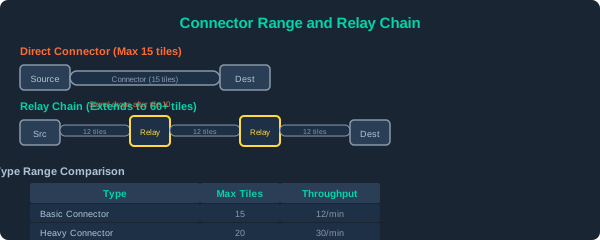
Connector range and relay placement: Basic Connector range is 15 tiles. Relay placed at tile 13 extends the chain with full throughput renewed at each relay hop.
Relay Chain Design for Long Distances▼/span>
Standard Relay Chain
Source -> Connector (12 tiles) -> Relay -> Connector (12 tiles) -> Relay -> Destination
Each relay costs 10 Electronics + 5 Superalloy to build. For a 50-tile run, budget 4 relays.
When to Use Relays vs Alternative Methods
| Distance | Best Method | Cost | Throughput | Complexity |
|---|---|---|---|---|
| < 15 tiles | Direct Connector | Low | Best | None |
| 15-30 tiles | 1 Relay + Connector | Medium | Good | Low |
| 30-60 tiles | 2-4 Relays + Connectors | High | Moderate | Medium |
| 60+ tiles | Drone hub + cargo drone | Very High | Variable | High |
| Cross-planet | Cargo ship route | Highest | High | Very High |
Relays vs Drones: The 50-Tile Rule
Below 50 tiles, relay chains are cheaper and more reliable than drones. Above 50 tiles, cargo drones become cost-effective because you skip the relay infrastructure. At exactly 50 tiles, compare: a 4-relay chain costs ~60 Electronics vs a single Drone Hub + 2 drones costs ~120 Electronics. Relays win on cost, drones win on flexibility.
Relay Placement Tips
- Never at max range. Place relays at 12 tiles, not 15. The last 3 tiles are where signal dropoff hurts.
- Elevation matters. Relays on the same floor level get full signal. A relay one floor above or below loses 2-3 tiles of effective range.
- Avoid right angles. Each 90-degree turn in the chain reduces max range by 2 tiles. Use 45-degree paths or place a relay at the corner.
- Test before building the full chain. Place one relay and check the Connector status panel. If “Signal Strength” shows anything below 90%, move the relay closer.
Common Connector Problems That Look Like Range Issues
| Symptom | Actual Cause | Fix |
|---|---|---|
| Connector stops working mid-line | Range exceeded or relay missing | Check tiles, add relay if >15 |
| Connector works but slow | Near max range, signal dropoff | Move relay 2-3 tiles closer |
| Relay has power but no link | Relay facing wrong direction | Rotate relay to face both connectors |
| Everything worked yesterday | A building was moved between relay and source | Re-check relay line of sight |
| Connector flashes red and green | Power fluctuation on the sub-grid | Add dedicated power line to connector chain |
Rule of Thumb
If your connector run looks long, it is too long. Place a relay at the halfway point. The extra building cost is trivial compared to debugging why a section of your factory is starving for materials that never arrived.
Special Cases
Underground Routing
When you need to cross a room or walkway without visible connectors on the floor, run the connector along the ceiling or through a service corridor. The range is the same but the visual obstruction disappears.
Multi-Station Transport
For connector chains that cross station boundaries (e.g., between your main station and an attached module), the effective range drops by 30%. Compensate by placing relays at 8-10 tile intervals instead of 12.
Pipe Range vs Connector Range
Pipes have a shorter max range (10 tiles) than connectors (15 tiles). For combined gas + item transport lines, place the relay at the pipe midpoint (tile 5-6) to satisfy both constraints with one building.