Co-op Multiplayer Guide: Play Outworld Station With Friends
Outworld Station supports up to 4 players in online PVE co-op. You can share exploration, combat, and construction tasks with your friends. But like most co-op games, there are some things that work differently than single-player — and a few ways to mess it up.
Quick Answer
To play co-op:
- Host creates a game from the main menu or pause menu
- Friends join via Steam overlay (right-click host → Join Game) or through in-game lobby
- Everyone shares the same station, resources, and progress
Key points:
- Only the host’s save file persists
- All players can build, mine, and fight
- Progress is tied to the host’s game
How Co-op Works
Hosting a Game
When you host, you’re creating a session that others can join:
- From main menu: Select “Host Game” → Choose your save → Set room name (optional)
- From in-game: Press Escape → “Open to Players” → Set room name
Your friends will see your game in their Steam friends list or can join via the in-game server browser.
Joining a Game
Option 1: Steam Overlay
- Open Steam overlay (Shift+Tab)
- Right-click your friend who’s hosting
- Select “Join Game”
Option 2: In-Game Browser
- Main menu → “Join Game”
- Find your friend’s room name
- Click to join
Option 3: Direct Invite
- Host sends you an invite through Steam chat
- Click the invite link
What Everyone Shares
In co-op mode, you’re all working on the same station:
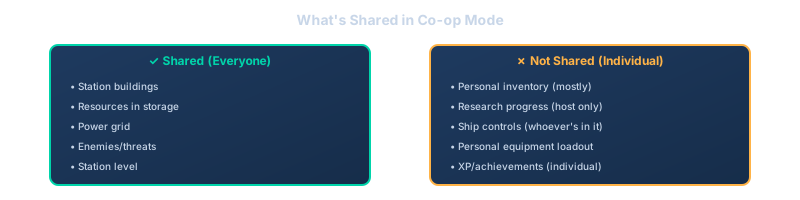
This means if one person builds a smelter, everyone can use it. If someone empties a storage chest, it’s empty for everyone.
Task Division Strategies
The best co-op sessions happen when you’re not all doing the same thing. Here’s how to split work effectively:
Strategy 1: Specialist Roles
Assign each player a focus area:
Player 1: Builder/Architect
- Plans station layout
- Places production buildings
- Manages belt routing
Player 2: Miner/Explorer
- Finds asteroid fields
- Sets up mining operations
- Explores for new zones
Player 3: Combat/Defense
- Handles drone threats
- Builds turret coverage
- Responds to attacks
Player 4: Logistics/Power
- Manages power grid
- Balances resource flow
- Handles freighter routes
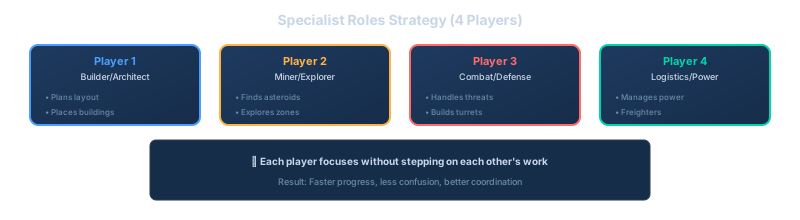
This works well because each person can focus without stepping on each other’s work.
Strategy 2: Zone-Based
Split the station into sections:
- North section: Player A handles all production there
- South section: Player B manages power and storage
- East section: Player C runs research and ship building
- Field operations: Player D handles mining and exploration
Clear boundaries prevent the “who built this?” confusion.
Strategy 3: Project-Based
Work on different projects simultaneously:
- Player A: “I’m setting up the steel production line”
- Player B: “I’m expanding the power grid for the new area”
- Player C: “I’m building the freighter route to the titanium field”
Check in every 10-15 minutes to make sure projects aren’t conflicting.
Communication Tips
Use Voice Chat
Outworld Station has a lot happening. Typing is too slow when:
- Something’s attacking
- You need resources NOW
- The power just died
Discord or in-game voice chat makes coordination way easier.
Call Out Important Actions
When you do something that affects everyone, say it:
- “I’m taking 500 iron plates for the ship”
- “Power grid is at 80% capacity”
- “New mining field found to the east”
Establish Building Conventions
Before you start, agree on:
- Where the main storage area is
- Which direction belts flow
- Who handles what type of building
This prevents the “why did you put a smelter in my research area?” arguments.
Common Co-op Problems
Problem 1: Resource Hoarding
One player keeps taking everything from storage for their project. Everyone else starves.
Fix: Agree on storage limits. “Don’t take more than 200 of any material without asking.” Or set up dedicated storage for each project.
Problem 2: Building Over Each Other
You place a building where someone else was planning to build. Now they have to work around it.
Fix: Claim areas before building. “I’m working in the northeast corner for the next hour.” Or use the map to mark zones.
Problem 3: Desync/Lag
Things look different on different players’ screens. Belts show different items, buildings appear/disappear.
Fix:
- Host should have the best internet connection
- Avoid rapid building/deleting (causes sync issues)
- If desync gets bad, save and reload
Problem 4: Host Disconnects
Host leaves, everyone gets booted. Progress might be lost.
Fix:
- Host should save before important milestones
- If host needs to leave, have them save first
- Consider rotating host duties for long sessions
Problem 5: Different Play Paces
One player is a “optimize everything” type, another just wants to build. Friction happens.
Fix: Talk about it early. Either:
- Split tasks so each person works at their own pace
- Agree on a shared pace (“let’s not worry about perfect ratios yet”)
- Take turns driving the big decisions
Tips for a Better Co-op Experience
Tip 1: Start Fresh Together
Don’t invite friends to your 20-hour save where you’ve already built everything. Start a new station together. Everyone learns the layout and feels ownership.
Tip 2: Share the Map
When someone explores a new area, have them ping it on the map so everyone knows where it is. “Titanium field found here” markers save a lot of searching.
Tip 3: Designate a “Lead Architect”
One person should have final say on layout decisions. Not because they’re bossy, but because conflicting layouts create mess. The lead can still delegate, but they resolve the “where does this go?” questions.
Tip 4: Use Color-Coded Storage
If the game supports it, use different colored storage for different purposes:
- Red crates: Raw materials
- Yellow crates: Intermediate products
- Blue crates: Finished goods
Everyone knows where to find (and return) things.
Tip 5: Save Regularly
Co-op sessions can go long. Save every 30-60 minutes. If something goes wrong (crash, desync, bad decision), you can reload.
Tip 6: Have a “Reset” Plan
Sometimes you build something that just doesn’t work. Agree upfront: “If we need to tear down and rebuild, that’s okay.” Avoids the sunk-cost-fallacy arguments.
FAQ
**Q: What happens if the host leaves?
A: The session ends for everyone. Only the host’s save file is updated, so progress persists in their save. Guests should coordinate with the host if they need to leave mid-session.
Q: Can guests continue playing if the host goes offline?
A: No. The session is hosted on the host’s machine. When they disconnect, the session ends.
Q: Do achievements work in co-op?
A: Yes, but each player earns them individually based on their own actions.
Q: Can I bring my single-player character into co-op?
A: Your personal equipment loadout carries over, but you’re playing on the host’s station. Your single-player base stays separate.
Q: What’s the ideal group size?
A: 2-3 players is sweet spot. Four is fun but coordination gets harder. Two works great for close collaboration.
Q: Does difficulty scale with player count?
A: Enemy threats scale somewhat, but not dramatically. More players makes most things easier, not harder.
Q: Can I play with friends on different platforms?
A: Outworld Station is PC-only currently, so all players need to be on PC/Steam.
Advanced Co-op Tactics
Once you’ve got the basics down, here are some techniques that make co-op even more effective.
Parallel Production Lines
Instead of everyone working on one production chain, split into parallel lines:
Team A: Iron processing chain
- Iron ore mining
- Smelting
- Steel production
Team B: Copper/Titanium chain
- Copper extraction
- Titanium processing
- Alloy production
Each team can work independently, then merge outputs at a central storage. This avoids the bottleneck of everyone needing the same resources at the same time.
Relay Exploration
When exploring distant asteroid fields:
- Player A goes out to find the field
- Player B follows behind setting up freighter waypoints
- Player C prepares the receiving station
- Player D sets up processing for the new materials
By the time Player A finds the field, the infrastructure to use it is already being built.
Combat Coordination
When enemies attack:
- One player calls out the direction and type
- Combat-focused player engages
- Others secure power and production (don’t let the attack distract from critical systems)
- After fight, one person repairs while others continue production
This keeps attacks from completely derailing your progress.
Research Sprints
Research is tied to the host, but everyone can contribute:
- Non-host players gather research materials
- Host focuses on running research labs
- Everyone contributes to building the research infrastructure
This way, research isn’t bottlenecked by one person doing everything.
Session Management
Before You Start
Agree on session goals:
- “Tonight we’re setting up steel production”
- “This session is for exploring the third zone”
- “We’re just messing around, no pressure”
Clear expectations prevent frustration when someone wants to optimize and others want to explore.
Check everyone’s time:
- “I’ve got about 2 hours”
- “I can stay until 10pm”
Plan accordingly. Don’t start a major project if half the team needs to leave in 30 minutes.
During the Session
Take breaks together:
- Pause for 5-10 minutes every hour
- Discuss what’s working, what isn’t
- Adjust plans if needed
Save at milestones:
- After completing a major project
- Before attempting something risky
- Every 45-60 minutes regardless
Ending the Session
Wrap-up routine:
- Host saves the game
- Quick discussion: “What are we doing next time?”
- Note any unfinished business: “We started the freighter route but didn’t finish”
This makes the next session start smoothly.
Troubleshooting Connection Issues
Can’t See Friend’s Game
Check:
- Both on same Steam region? (Settings → Downloads → Download Region)
- Friend actually hosting? (They need to “Open to Players”)
- Steam friends status showing online?
Try:
- Host sends direct invite via Steam chat
- Use room name in in-game browser
- Restart Steam (rarely needed, but fixes some issues)
Lag and Performance
If one player is lagging:
- Check their internet connection
- Lower graphics settings (doesn’t affect others)
- Have them avoid rapid building/deleting
If everyone is lagging:
- Host’s connection matters most — consider switching to player with best internet
- Check if anyone’s downloading/streaming in background
- Server might be having issues (check Steam status)
Desync Symptoms
You’re desynced if:
- Items on belts look different to different players
- Buildings appear/disappear unexpectedly
- Actions don’t seem to register
Fix:
- Host saves the game
- Everyone disconnects
- Host reloads and re-opens
- Everyone rejoins
This resyncs everyone to the same state.
Making Co-op Fun
The point is to have fun together. Some things that help:
Celebrate Wins
- First successful freighter route? Everyone gathers to watch it arrive
- Station level up? Take a screenshot together
- Survived a tough attack? Acknowledge it
These moments build the “we did this together” feeling.
Share the Cool Moments
When someone finds something neat:
- “Check out this asteroid field I found”
- “Look at how fast this production line is running”
- “Come see this view”
Don’t just optimize — enjoy the game together.
Help Struggling Players
If someone’s frustrated:
- “Let me help you with that belt routing”
- “I’ll handle the combat, you focus on building”
- “Take a break, we’ve got this”
Co-op means supporting each other, not just sharing a map.
Related Guides
- Station Layout Guide — Build stations that work for multiple players
- Beginner Mistakes — Avoid these in co-op too
- Freighter and Mining Guide — Coordinate remote operations
- Drone Defense Guide — Share defense duties effectively