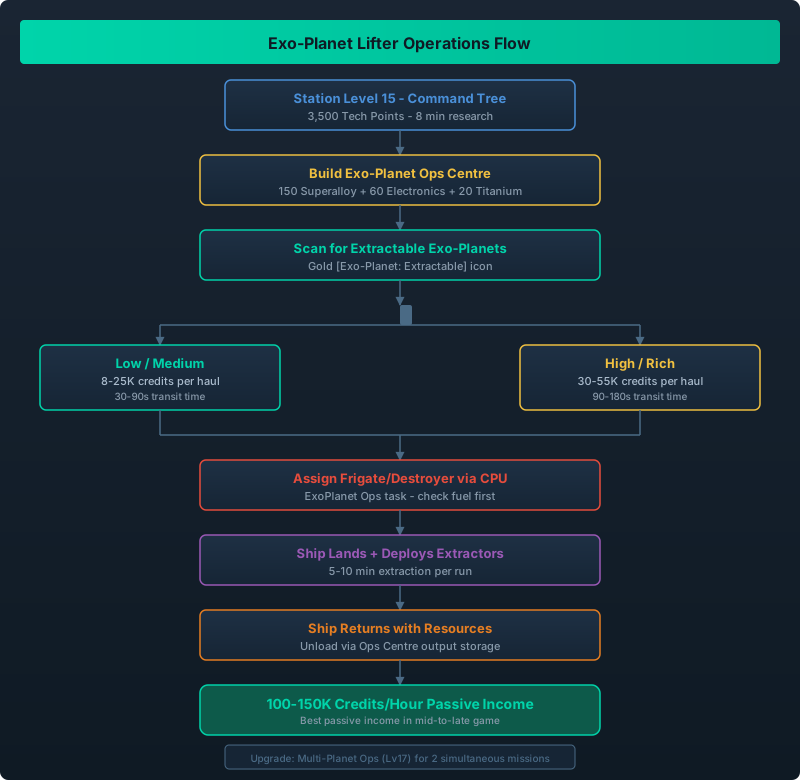
Exo-Planet Lifter system flow from unlocking through ship dispatch, surface deployment, and resource return to station
The Endgame Resource Tap You Have Been Missing
By Station Level 16, you have mined every asteroid in your local cluster and your remote outposts are running at max capacity. But there is one resource source most players ignore: exo-planet surfaces. The Exo-Planet Lifter upgrade in v1.1 gives your ships the ability to land on exo-planet surfaces, deploy extraction equipment, and return with rare resources that cannot be mined any other way.
I started Exo-Planet operations at Level 17 and the first extraction run brought back 22 units of Exotic Matter worth roughly 50,000 credits on the market. The setup cost paid for itself in one trip.
If you are still building out your fleet, start with our Ship Building Guide first.
Unlock Exo-Planet Lifter at Station Level 15 in the Command Tree (3,500 Tech Points). Build an Exo-Planet Ops Centre on your station. Assign a Frigate or Destroyer through CPU Control to ExoPlanet Ops missions. The ship lands on a selected planet, deploys extractors, and returns after 5-10 minutes with surface resources worth 15-50K credits per run.
Unlocking the Exo-Planet Lifter System
| Requirement | Detail |
|---|---|
| Station Level | 15 |
| Tech Cost | 3,500 Tech Points |
| Research Time | 8 minutes |
| Prerequisite Tech | Enhanced Containment or Logistics IV |
| Module Needed | Exo-Planet Ops Centre (150 Superalloy, 60 Electronics, 20 Titanium) |
The Exo-Planet Lifter appears in the Command Tree at Level 15. It requires either Enhanced Containment (Level 13) or Logistics IV (Level 14) as a prerequisite. The Ops Centre module is built on your station – press B, Infrastructure tab, select Exo-Planet Ops Centre.
Cost note: 150 Superalloy is steep for this stage of the game. If Superalloy is tight, prioritize building a second Plasma Forge. Our Superalloy Guide covers the most efficient production chains.
How Exo-Planet Operations Work
| Step | Action | Details |
|---|---|---|
| 1 | Scan for exploitable exo-planets | Use the Long Range Scanner. Exploitable planets have a gold icon and are tagged as [Exo-Planet: Extractable]. |
| 2 | Open Exo-Planet Ops Centre | The new panel shows all extractable planets within scanner range along with their resource potential (Low / Medium / High / Rich). |
| 3 | Select target and ship | Click a planet to see its resources. Assign a ship to the mission. Frigates and Destroyers work best – they have the landing gear and cargo capacity. |
| 4 | Dispatch mission | The ship flies to the planet (travel time varies from 30s to 3 min depending on distance), lands, and deploys extractors. |
| 5 | Collect results | After 5-10 minutes of extraction, the ship returns automatically. Unload the resources from the Ops Centre’s output storage. |
CPU Control required: Exo-Planet missions use the Ship CPU system. Your ship must be assigned to a CPU slot and the task set to ExoPlanet Ops. See our Ship CPU Control Guide for how to set up CPU assignments.
Distance tip: The Ops Centre panel shows transit time. I aim for planets under 90 seconds transit – anything longer and the fuel cost eats into profits. A planet with Rich potential at 45 seconds transit is optimal.
Planet Resource Potential and What You Get
| Potential Level | Resources Found | Average Haul Value | Transit Time |
|---|---|---|---|
| Low | Basic minerals, some Exotic Matter | 8-12K credits | 30-60s |
| Medium | Exotic Matter, rare gases, Platinum | 18-25K credits | 45-90s |
| High | Exotic Matter, Helium-3, Quantum Dust | 30-40K credits | 60-120s |
| Rich | Exotic Matter, Quantum Dust, Dark Matter traces | 40-55K credits | 90-180s |
Planet quality vs. transit time trade-off: A Low potential planet 30 seconds away might give you 10K credits every 5 minutes (120K/hour equivalent). A Rich planet 3 minutes away gives 50K credits every 10 minutes (100K/hour). The Low planet is actually better for consistent income. I run two Low-to-Medium planets simultaneously for steady cash flow.
| Resource | Found On | Market Price | Best Use |
|---|---|---|---|
| Exotic Matter | All exo-planets | ~2,200 cr/unit | Primary export |
| Helium-3 | Medium+ planets | ~1,800 cr/unit | Ship fuel / Endgame |
| Quantum Dust | High+ planets | ~5,000 cr/unit | Endgame crafting |
| Platinum | Low+ planets | ~1,200 cr/unit | Advanced electronics |
| Dark Matter | Rich only | ~12,000 cr/unit | Space Elevator |
Best Ships for Exo-Planet Operations
Not all ships can handle surface extraction. Here is my testing:
| Ship Class | Verdict | Reason |
|---|---|---|
| Frigate | Best all-rounder | Has landing gear, 80 cargo, decent fuel capacity |
| Destroyer | Best for Rich planets | 160 cargo, heavy landing gear, can carry more extractors |
| Freighter | Acceptable | Can land but slow deployment, cargo is good |
| Corvette | Poor | Low cargo (15-20) means tiny hauls |
| Fighter | Cannot land | No landing gear for surface ops |
The Kestrel Corvette and Vanguard Frigate are the sweet spot. I run two Vanguards on 45-second transit planets and cycle them. While one is extracting, the other is in transit. This gives me continuous income without downtime.
Exo-Planet Ops Centre Upgrades
| Upgrade | Level | Effect | Cost |
|---|---|---|---|
| Advanced Landing Gear | 16 | -30% transit time, +20% cargo capacity for Exo runs | 2,800 TP |
| Multi-Planet Operations | 17 | Run 2 simultaneous missions per Ops Centre | 4,500 TP |
| Deep Surface Analysis | 18 | Unlocks Dark Matter extraction on Rich planets | 6,000 TP |
| Automated Resupply | 19 | Ships refuel at planet instead of returning for fuel | 8,000 TP |
All extraction yields and market prices from v1.1.1.0. Transit times vary by planet position. Fuel consumption based on Frigate-class ships with standard thrusters. Official patch v1.1 reference: Steam News.