Your Miners Are Right There — And Your Base Is Starving
You found a titanium vein on the other side of the asteroid belt. You built a mining rig on it. You watched it extract ore. And then you realized: how do you get that ore back to your smelter?
The answer is freighters. But the game does a terrible job explaining how freighter docks work, how to set up automated mining stations, or why your first attempt will probably result in ships flying back and forth with empty cargo holds.
I wasted six hours on my first mining outpost because I connected the freighter dock to the wrong container. Six hours. This guide is so you don’t have to. Check our Beginner Mistakes Guide for more traps like this.
The Short Version
Freighters are automated cargo ships that fly between docks. You build a Freighter Dock at your main station, another at the mining outpost, and the ships carry resources back and forth on a loop. No manual piloting required. For station power, see our [Fusion Reactor Guide](/guides/fusion-reactor-guide/).
Prerequisites — What You Need Before Building Freighters▼/span>
Do not start building freighter infrastructure until you have these running:
| Requirement | Why | Minimum |
|---|---|---|
| Stable power | Freighter docks draw 8-15 power/sec each | 2 Small Reactors or 8 Solar Panels |
| Shipyard | You need this to build the freighter ship itself | Unlocked via Station Level 5+ research |
| Freighter Dock | The building that sends and receives ships | Research: “Freighter Logistics” |
| Iron Ingots + Silicon | Ship construction materials | 50+ Ingots, 30+ Silicon buffered |
| A remote mining site | Freighters need somewhere to go | At least 1 Miner placed on an asteroid |
Common Mistake
Building a Freighter Dock before you have stable power. The dock needs power to both launch and receive ships. If your grid blacks out mid-transit, the ship gets stuck in limbo and you have to rebuild it.
Research order recommendation:
- Basic Logistics (unlocks pipes and connectors)
- Mining Expansion (unlocks remote miners)
- Freighter Logistics (unlocks Freighter Dock)
- Freighter Mk2 (faster ships, larger cargo)
Skip nothing in this chain. Each tier builds on the last.
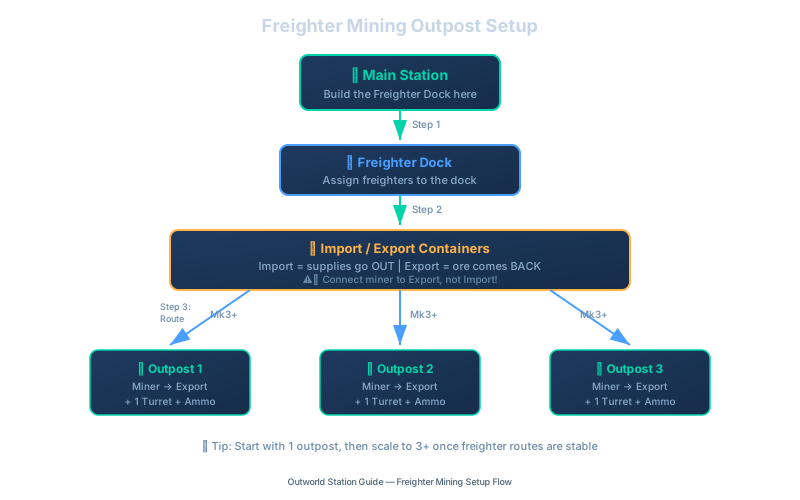
Freighter mining outpost setup process from main station dock to 3 remote outposts with automated defense
How Freighter Docks Actually Work▼/span>
A Freighter Dock is a two-way building. It both sends and receives ships. Think of it as an airport, not a post office.
The Loop

Freighter ship travel cycle from main station dock to mining outpost and back
Each ship in your fleet follows this loop automatically. You do not assign routes. You do not schedule departures. The dock handles everything — as long as you set it up correctly.
Cargo Flow Direction
This is where most players mess up. The Freighter Dock has two container connections:
- Import Container: Where the dock drops off incoming goods
- Export Container: Where the dock picks up goods to send out
At your main station:
- Import = receives ore from the outpost (connect this to your smelter input)
- Export = sends supplies to the outpost (fuel, building materials, etc.)
At your mining outpost:
- Import = receives supplies from the main station
- Export = sends ore back to the main station (connect this to your miner output)
Got It Backwards?
If your freighters fly back and forth but never deliver anything, you probably connected the miner to the Import container instead of the Export container. I did this. Twice. The fix is simple: swap the connections.
Ship Capacity and Speed
| Ship Type | Cargo Slots | Speed | Build Cost | Best For |
|---|---|---|---|---|
| Small Freighter | 8 | Fast | Low | Early game, single-resource runs |
| Medium Freighter | 16 | Medium | Medium | Mid-game, multi-resource routes |
| Large Freighter | 32 | Slow | High | Late game, bulk transport |
For your first mining outpost, a Small Freighter is enough. You can always upgrade later.
Step-by-Step: Setting Up Your First Mining Outpost▼/span>
Step 1: Find a Mining Spot
Open your star map and look for asteroids with resource icons. Fly there in your personal ship and scan the asteroid. You want:
- High-density ore (shows as bright spots on the scanner)
- No enemy spawns nearby (check for red zones)
- Within 2 sectors of your main station (shorter freighter trips = faster throughput)
Step 2: Build the Outpost
Land on the asteroid and place these buildings in this order:
- Solar Panels (4-6) — power first, always
- Miner — on the ore vein
- Storage Container — next to the miner
- Freighter Dock — as close to the storage container as possible
- Connector — from Miner → Storage Container
- Connector — from Storage Container → Freighter Dock (Export side)
Step 3: Connect the Docks
Go back to your main station. Build a Freighter Dock there. Now open the dock’s interface at your main station and select “Connect to Remote Dock.” Pick your mining outpost from the list.
The two docks are now linked.
Step 4: Build and Assign a Freighter
Open your Shipyard. Build a Small Freighter. Once complete, go to your main station’s Freighter Dock interface and assign the ship to the route.
The freighter launches immediately. It will:
- Fly to the outpost
- Pick up whatever is in the Export container
- Fly back
- Drop it in the Import container
- Loop forever
Step 5: Verify the Flow
Watch one full cycle. Check:
- Miner is producing ore (check the miner’s output)
- Ore is flowing into the Storage Container (check the container)
- Ore is in the Export side of the Freighter Dock (check the dock)
- Freighter arrives at main station with ore in cargo (check Import container)
If any of these fail, trace backwards from the problem point.
Pro Tip
Add a second Storage Container at your main station's Import side, connected to your smelter input. This creates a buffer so your smelter never starves between freighter runs.
Scaling Up: Multi-Planet Mining Networks▼/span>
Once you hit Station Level 8, one mining outpost is not enough. You need multiple planets feeding your factory simultaneously. Here is how to set it up without creating a logistical nightmare.
The Hub-and-Spoke Model

Multi-planet wormhole chain routing through intermediate stations to the main hub
Your main station is the hub. Every mining outpost is a spoke. Freighters fly directly between each outpost and the main station. Do not try to create outpost-to-outpost routes — it complicates everything and doubles your transit time.
How Many Freighters Per Route?
| Ore Type | Production Rate | Recommended Ships | Why |
|---|---|---|---|
| Iron | High (20-40/sec) | 2 Small or 1 Medium | Iron flows fast, you need constant pickup |
| Titanium | Medium (10-20/sec) | 1 Small | Slower extraction, one ship keeps up |
| Tungsten | Low (5-10/sec) | 1 Small | Rare ore, low volume |
| Silicon | Medium (10-15/sec) | 1 Small | Steady but not overwhelming |
Rule of thumb: If your Export container at the outpost is more than 75% full, add another freighter.
Wormhole Integration
Once you unlock Wormhole Generators, you can skip freighters entirely for planets that have a wormhole connection. Wormholes sync inventories instantly — no ship travel time needed.
But freighters still have a role: for planets too far for wormholes, or for moving items that you do not want cluttering your wormhole-linked storage.
Wormhole + Freighter Combo
Use wormholes for high-priority resources (Superalloy components, antimatter ingredients). Use freighters for bulk low-priority stuff (iron, silicon). See our [Superalloy Guide](/guides/superalloy-guide/) for priority resource details. This prevents your wormhole link from getting choked with basic materials.
Troubleshooting Common Freighter Problems▼/span>
Freighter Flies But Delivers Nothing
Cause: Export/Import containers are swapped, or the miner is not connected to the Export container.
Fix: Check the cargo flow direction. At the outpost, the miner’s output must feed into the Export side of the dock.
Freighter Gets Stuck or Disappears
Cause: Power failure at either dock mid-transit. Ships need power at both ends to complete their route.
Fix: Add battery backups at both docks. Even a single Battery Bank can keep the dock alive long enough to receive a ship during a brief power dip.
Outpost Runs Out of Power
Cause: Solar panels are not enough if the outpost is in shadow, or you added too many miners.
Fix: Replace solar with a Small Reactor at the outpost. The reactor runs on basic fuel and is more reliable than solar for remote sites.
Freighter Takes Too Long
Cause: The outpost is too many sectors away, or you are using a Large Freighter (slow) for a short route.
Fix: Use Small Freighters for nearby outposts. Reserve Large Freighters for cross-planet bulk hauls. Or build a Wormhole connection instead (see our Wormhole Terminal Guide for setup).
Mining Outpost Gets Attacked
Cause: Enemy spawns in hostile sectors.
Fix: Build a Missile Turret or Laser Turret at the outpost. One turret is usually enough for early raids. For late-game raids, add Drone Shields.
Quick Reference — Freighter Setup Cheat Sheet▼/span>
At the Mining Outpost
- Solar Panels / Small Reactor
- Miner on ore vein
- Connector: Miner → Storage
- Connector: Storage → Dock Export
- Freighter Dock (Export = ore out)
At the Main Station
- Freighter Dock (Import = ore in)
- Connector: Dock Import → Buffer Storage
- Connector: Buffer → Smelter
- Assign freighter ship to the route
- Watch one full cycle to verify
Tested across multiple save files at Station Levels 5 through 12. Freight behavior verified in version 1.0.0.2.