Your Storage Is Full and Production Has Stopped
You have 3,000 Iron Plates. Your factory only needs 1,500. The excess sits in storage, filling every available container. Then a Full Storage event triggers: your Smelters cannot output because the buffer is full. Your Drills stop because the silo filled. Your Assemblers stop because they cannot receive the components blocked behind the full storage.
This is the overflow deadlock. It is the most common cause of “factory stopped for no reason” in Outworld Station. The fix is not more storage. The fix is a resource sink —a way to consume, convert, or discard surplus materials before they block production.
The Short Version
Build three sink types: Recycling (turn surplus into scrap for repurposing), Overflow-to-storage routing (divert excess to long-term silos), and Material conversion (feed surplus into advanced production chains that output higher-value items). Do not let any single material fill more than 80% of your active storage buffer.
The Three Sink Methods (Pick One Per Material)▼/span>
Method 1: Recycling Sink
Build a Recycler. Connect it to your overflow buffer with a priority gate set to “Open > 80% full.” The Recycler converts surplus items into Scrap at a 4:1 ratio. Scrap can be fed back into basic production or stored for later use.
| Material | Scrap Yield | Recycler Time | When to Use |
|---|---|---|---|
| Iron Plate | 1 Scrap | 2 sec | When iron > 2000 and stable |
| Copper Ingot | 1 Scrap | 2 sec | When copper > 1500 and stable |
| Excess Ammo | 2 Scrap | 3 sec | When ammo > 500 (overproduced) |
| Old Modules | 3-5 Scrap | 5 sec | When upgrading to new tier |
Method 2: Overflow-to-Satellite Storage
Route surplus to a dedicated “long-term storage” room that is not part of your active production line. The material sits there until you explicitly need it. This prevents buffer back-pressure without wasting resources.
Main Buffer (0-80%) -> Production line
Main Buffer (80-100%) -> Divert gate -> Satellite Storage -> Sit idle until needed
Method 3: Material Conversion (Upcycling)
Feed surplus basic materials into advanced production chains that output higher-tier items. This consumes 3-4 units of surplus to create 1 unit of advanced material, reducing volume while increasing value.
| Surplus | Convert To | Consumption Rate | Value Gain |
|---|---|---|---|
| Iron + Copper | Electronics | 5:1 | High |
| Titanium + Tungsten | Superalloy | 3:1 | Very High |
| Excess Gas | Nitrox | 2:1 | High |
| Chemicals + Ore | Alloy Ingots | 4:1 | Moderate |
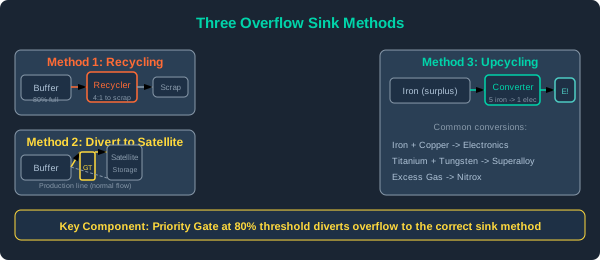
Three overflow sink methods: Recycling (turn to scrap), Overflow storage (divert excess), Upcycling (convert to higher-value items)
Setting Up Priority Gates (The Key Component)▼/span>
Priority Gate Configuration
A Priority Gate lets you set a “fill threshold” that redirects surplus:
- Place a Priority Gate on the connector between your production buffer and main storage
- Set the threshold to 80%
- Connect the “Overflow Output” to your sink (Recycler, satellite storage, or converter)
- The gate now sends everything above 80% to the sink, keeping your active buffer healthy
Gate Threshold Recommendations
| Material Type | Threshold | Reason |
|---|---|---|
| Iron, Copper, Steel | 80% | High consumption, need room for fluctuation |
| Electronics, Circuits | 70% | Expensive, avoid recycling unless forced |
| Ammo, Fuel Cells | 60% | Dangerous if overproduced and not stored safely |
| Gas tanks | 85% | Gas overflows less harmful than solids |
| Scrap, Trash | 50% | Limit scrap storage, recycle aggressively |
Automation Check
Once your priority gates are set, verify they work:
- Fill a test item into the production buffer
- Watch the gate trigger at the 80% mark
- Confirm the overflow route carries items to the sink
- Check the sink consumes or stores items within 30 seconds
When Not to Use a Sink
| Situation | Better Approach | Why |
|---|---|---|
| Early game (first 2 hours) | More storage | You will use everything eventually |
| Rare materials | Dedicated storage, no sink | Scrapping rare mats wastes mining time |
| Upgrade parts | Keep them | You will need them for the next tier |
| Surplus is temporary | Wait 5 minutes | A consumption spike might clear it naturally |
The 80% Rule
If any material stays above 80% of its buffer for more than 10 minutes of continuous production, you are overproducing. Either expand your consumption chain or install a permanent sink for that material. If it stays above 80% for an hour, that sink should be automatic (priority gate + recycler), not manual.
Overflow Warning Signs
| Symptom | Likely Cause | Action |
|---|---|---|
| Smelter idle with “Output Full” | Overflow at buffer | Check buffer level, add sink |
| Assembler waiting for input | Starvation from overflow elsewhere | Priority gate at the blocking material |
| Storage showing all items at 100% | No sink installed at all | Build recycler + priority gate |
| Items sitting at gate entrance | Gate threshold set too high | Lower to 70-80% |
| Recycler running 24/7 | Net overproduction | Reduce production, not sink |