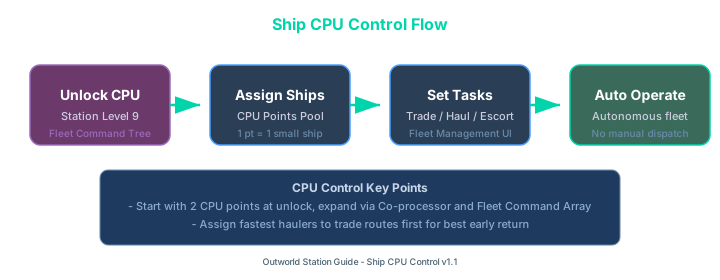
Ship CPU control flow from unlocking at Station Level 9 through CPU assignment, task selection, and autonomous operation
Your Ships Are Wasting Time. Here is How CPU Control Fixes It
Before v1.1, your completed ships just sat there until you manually clicked them and told them what to do. You had to micromanage every single trip. With the Ship CPU system, you assign a number of your finished ships to the CPU, give them tasks, and they run autonomously. I swapped my whole freighter fleet over in about 10 minutes, and I have not manually dispatched a ship since.
If you are still building your first ships, start with our Ship Building Guide to understand the basics of hulls, thrusters, and cargo modules. The CPU system only works on completed ships, so you need something worth controlling first.
Unlock CPU Control at Station Level 9 through the Command Tree. Each CPU point controls one small ship or one slot on a larger ship. Assign tasks like Trading, Resource Hauling, Escort, or Patrol from the Fleet Management panel. Start with 2-3 CPU points and assign your fastest haulers to trade routes for the best early return.
How to Unlock Ship CPU Control
CPU Control is not available at the start. You need to reach Station Level 9 and research the Fleet Command System in the Command Tree. It costs about 2,000 Tech Points and takes 4 minutes to research.
Once unlocked, a new Fleet Management tab appears in your station menu. This tab shows:
- Total CPU capacity (starts at 2, expands with upgrades)
- Each controlled ship with its current task and status
- Task assignment panel for each ship
For reaching station level 9 efficiently, check our Station Level Progression Guide for the fastest XP route.
CPU Capacity – How Many Ships Can You Control?
CPU capacity is measured in CPU Points. Different ship sizes consume different amounts:
| Ship Class | CPU Cost | Example Ships | Best Use |
|---|---|---|---|
| Fighter/Scout | 1 point | Osprey, Sparrow | Patrol, Escort |
| Freighter | 1 point | Pelican, Albatross | Trading, Resource Haul |
| Corvette | 2 points | Kestrel | Combat Patrol |
| Frigate | 3 points | Vanguard | Sector Defense |
| Destroyer | 4 points | Dauntless | Heavy Combat |
| Carrier | 6 points | Aegis | Fleet Support |
You start with 2 CPU points. Additional points come from:
- CPU Co-processor upgrade (Command Tree, Level 11) – adds +2
- Advanced Command Center (Command Tree, Level 14) – adds +3
- Station Module: Fleet Command Array (buildable at Level 15) – adds +5 per module (max 2)
A fully upgraded station at Level 16+ can control roughly 22 CPU points worth of ships.
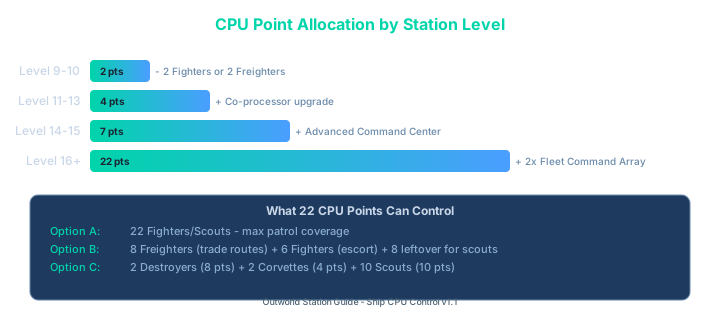
CPU point allocation guide showing how many ships each tier of CPU capacity can control at different station levels
Available Task Assignments
Once a ship is assigned to the CPU, you can give it one of these task profiles:
| Task | What It Does | Best Ship Type |
|---|---|---|
| Auto-Trade | Runs trade routes between stations automatically based on buy/sell prices | Freighter |
| Resource Haul | Transfers specified resources from outposts to station or vice versa | Freighter |
| Sector Patrol | Flies a patrol route around designated sectors, detects threats | Fighter/Corvette |
| Escort | Follows and protects a specific freighter or the station | Fighter |
| ExoPlanet Ops | Runs surface extraction missions on exo-planets (v1.1.0.4+) | Frigate/Destroyer |
| Salvage | Collects wreckage from recent battles in a sector | Freighter |
I tested Auto-Trade first. I set up a Pelican freighter running a route between my main station and a nearby allied outpost, buying Processed Alloys at 45 credits and selling at 78. It makes about 8,000 credits per hour with zero input from me.
If you want to optimize trade routes further, our Passive Income and Trading Guide covers the best buy-low/sell-high loops and how to find them.
CPU mechanics verified against Steam patch notes for v1.1 through v1.1.1.0. Ship-specific CPU costs tested with all ship classes available at Station Level 14 on patch v1.1.1.0.
For the official patch notes, visit the Steam Community announcement.