You Are Still Hand-Crafting Ships. Stop.
Every ship in Outworld Station needs Components, Electronics, Superalloy, and Ammo or Fuel Cells. If you are standing at the Shipyard manually clicking “craft” every time you need a new freighter, you are wasting time that should be spent expanding.
The game supports full automated ship production. You feed materials into a Shipyard, set a build queue, and the Shipyard outputs complete ships. But the setup has traps: buffer sizing, component priority, and the hull-limit problem that causes your shipyard to fill your station with 20 ships you did not ask for.
The Short Version
Connect a Shipyard to your component storage via connectors. Set a build queue in the Shipyard interface. Limit hull production with a "Hull Count" setting. One Shipyard fed by dedicated assemblers builds ships continuously without any manual crafting.
How Automated Ship Production Works▼/span>
The Shipyard Interface
A Shipyard has four material input slots that accept connector links:
| Input Slot | Accepts | Used For |
|---|---|---|
| Structural | Hull Plates, Superalloy, Scaffolds | Ship frame and armor |
| Power | Reactors, Fuel Cells, Batteries | Engine and power systems |
| Electronics | Circuit Arrays, Processors | Navigation and control |
| Weapons | Turrets, Ammo, Missiles | Defense and armament |
How Automation Works
- Connect each input slot to a storage buffer containing the required materials
- Open the Shipyard build queue
- Select a ship type and quantity (set to “Continuous” for indefinite production)
- The Shipyard pulls materials automatically and builds ships
- Completed ships launch if a valid dock is available, or queue in the Shipyard
The Build Queue Trick
Set your freighter queue to "Build Until: 3." The Shipyard will build until you have 3 freighters, then pause. When a freighter is destroyed or sent on a one-way mission, the count drops and the Shipyard auto-builds a replacement. No manual intervention needed.
Setting Up the Auto Shipyard (Step by Step)▼/span>
Step 1: Dedicated Component Production
Do NOT pull from your main storage. Build dedicated assemblers for each ship component:
| Component | Assemblers Needed | Feeds |
|---|---|---|
| Hull Plates | 2 | Structural slot |
| Superalloy Framing | 1 | Structural slot |
| Ship Reactors | 1 | Power slot |
| Fuel Cells | 2 | Power slot |
| Circuit Arrays | 1 | Electronics slot |
| Turret Mounts | 1 | Weapons slot |
Step 2: Buffer Setup
Place a 200-unit buffer between each assembler group and the Shipyard input slot. This absorbs production spikes and ensures the Shipyard never starves during a build.
Step 3: Connect and Configure
- Connect each buffer to the correct Shipyard input slot
- Open Shipyard interface, set ship type (start with Small Freighter)
- Set quantity: “Build Until: 2”
- Set minimum resource threshold: “Build if materials > 80% required”
Step 4: Test
Manually insert 50% of the required materials. The Shipyard should queue the build and start automatically. If it does not pull materials, check connector pair direction.
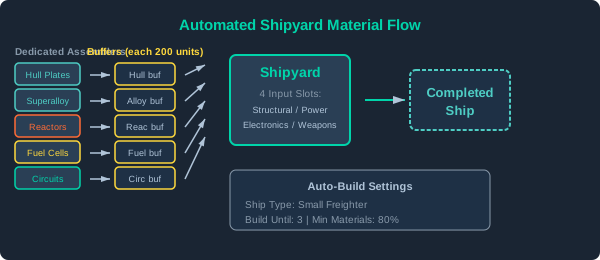
Automated shipyard material flow: Dedicated assemblers -> Buffers -> Shipyard inputs -> Completed ship
Ship Type Production Rates
| Ship Type | Build Time | Materials Needed | Assemblers Needed (full auto) |
|---|---|---|---|
| Small Freighter | 3 min | 200 Hull + 50 Electronics + 30 Fuel | 4-5 |
| Large Freighter | 8 min | 800 Hull + 200 Superalloy + 150 Electronics | 8-10 |
| Combat Ship (Small) | 2 min | 120 Hull + 40 Electronics + 20 Weapons | 3-4 |
| Combat Ship (Large) | 6 min | 500 Superalloy + 150 Electronics + 80 Weapons | 8-10 |
| Tug | 4 min | 300 Hull + 80 Electronics + 100 Fuel | 5-6 |
Common Automation Problems
| Problem | Cause | Fix |
|---|---|---|
| Shipyard says “Waiting for Materials” | Connector not paired to correct slot | Re-check input slot connections |
| Ships pile up at dock | No free dock space | Add more docks or set lower hull limit |
| Shipyard stops building mid-queue | One material ran out | Check that material’s assembler has enough input |
| Auto-build builds the wrong ship | Build queue has stale entries | Clear queue and re-set with correct type |
| Fuel cells not reaching Shipyard | Fuel cell buffer full of other items | Use dedicated buffer, not shared storage |
When to Automate Ship Production
Manually craft your first 2-3 ships. Then automate. The upfront cost of dedicated assemblers is worth it after 5+ ships. At that point, manual crafting becomes a time sink that slows your entire expansion.