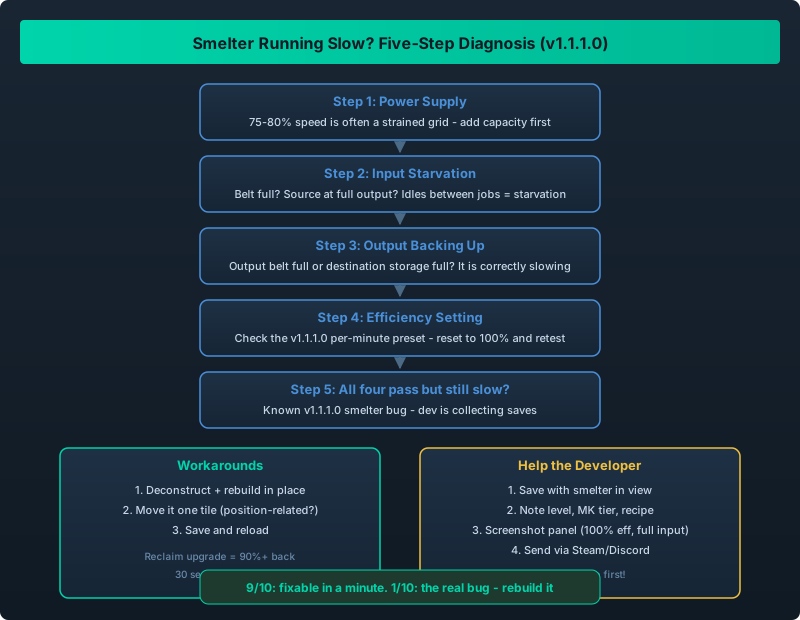
Smelter running slow? A five-step decision tree from power to bug report
The Bug the Developer Is Chasing
In v1.1.1.0 there is a known issue: smelters occasionally refuse to run at full speed even when inputs and power are available. The developer has acknowledged the reports and is collecting save files to reproduce it.
If your smelter block runs at 80% speed for no apparent reason, do not rebuild it yet. Work through this guide first – you may have one of the fixable causes, and if it is the real bug, you can help the developer squash it.
Before assuming the bug: check power supply, check input starvation, check output backing up, check the efficiency setting, and check the smelter recipe. If all five pass and the smelter still runs slow, it is the known v1.1.1.0 bug – export your save and send it to the developer. The workaround meanwhile: rebuild the smelter (deconstruct + place again) or move it one tile.
The Five-Step Diagnosis
Step 1: Power
A smelter running at exactly 75-80% is often a power supply issue, not a bug.
- Check the smelter’s power tab: is it receiving full power?
- Check your grid load: are you near capacity? (Multi-Source Power Grid Stability)
- If the grid is strained, add capacity first, then re-check speed.
Step 2: Input Starvation
If the input belt is not full, the smelter simply has nothing to process.
- Is the ore/ingot belt saturated?
- Is the source mine/producer actually at full output? (Asteroid Belt Mining Guide)
- Watch the smelter for 60 seconds: does it idle between jobs? That is input starvation.
Step 3: Output Backing Up
A smelter that produces faster than its output belt can carry will throttle itself.
- Is the output belt full or backed up?
- Is the destination storage full?
- If yes, the smelter is correctly slowing down. Fix the output side.
Step 4: Efficiency Setting
The v1.1.1.0 per-minute presets are handy, but a mis-set efficiency is easy to miss.
- Open the smelter panel and check the efficiency slider/preset.
- Is it set to 100% (or the per-minute rate you intend)?
- Reset to 100% and re-check.
Step 5: The Known Bug
If all four checks pass and the smelter still runs below full speed, you have hit the known v1.1.1.0 smelter bug.
Temporary workarounds that have worked for players:
- Deconstruct and rebuild the smelter in place (reclaim is 90%+ with the upgrade, see Recycling Guide).
- Move it one tile – some reports say the bug is position-related.
- Save and reload – the v1.1.1.0 save/load fixes sometimes clear it.
Do not confuse this with the 540 logistics cap. The smelter bug is per-machine (one smelter runs slow while its neighbor runs full). The 540 cap is per-channel (everything on one belt is limited). Different problems, different fixes.
How to Help the Developer Fix It
The developer explicitly asked for save files. A good bug report:
- Save the game with the slow smelter in view.
- Note the station level, the smelter type/MK tier, and the recipe it is running.
- Screenshot the smelter panel showing efficiency = 100% and inputs full.
- Send the save file + notes to the developer (via the Steam discussion board or the official Discord, linked in the game’s store page).
Save files live in your game’s save directory – see Save Backup Guide for the exact path. Back up before sending; you do not want to lose your save to a cloud-sync hiccup.
The Fix Timeline
As of the August 6 GeForce NOW announcement, no hotfix for the smelter bug has shipped. The next patch (likely v1.1.1.1 or v1.2) is the earliest we would expect it. Until then, the rebuild workaround takes about 30 seconds per smelter and costs almost nothing with reclaim enabled.
Nine times out of ten, a “slow smelter” is power, input, output, or efficiency – all fixable in under a minute. One time in ten, it is the real v1.1.1.0 bug: rebuild the smelter as a workaround and send your save to the developer. Do not rebuild your entire smelter block before running the five-step check.