Station Layout Guide: Build Efficient Factories in Outworld Station
Building a space station factory sounds straightforward until you realize you’re working with limited space, two levels, and a grid system that doesn’t always cooperate. After restarting my third station because I painted myself into a corner, I figured I should write this down.
Quick Answer
The three rules that matter most:
- Plan your main bus direction early — Once you commit to a belt direction, changing it means tearing down half your station
- Use both levels deliberately — Lower level for raw processing, upper level for finished goods keeps things clean
- Leave expansion gaps — You will need more space than you think. Always.
Why Layout Actually Matters
Outworld Station isn’t like other factory games where you can just sprawl infinitely. The station structure forces you into specific constraints:
- Limited build area that expands with station level
- Two-level system where you can’t always build what you want where you want
- Grid restrictions that make certain configurations awkward
- Throughput bottlenecks that aren’t obvious until you’re producing at scale
I ignored all of this my first playthrough. My “compact” design became a maze of cross-feeding belts by hour 10. Don’t do what I did.
Core Layout Principles
1. The Main Bus Approach
If you’ve played Factorio, you know this one. Set up a central belt highway carrying your most-used materials:
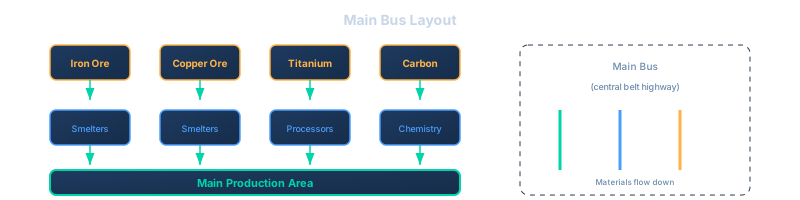
Why it works: You pull from the bus when you need something, feed back to it when you produce intermediates. Expanding means extending the bus, not reworking your whole factory.
Common mistake: Running the bus through the middle of your production area. Keep it on one edge so you can extend it.
2. Two-Level Strategy
The game gives you two levels for a reason. Here’s how I use them:
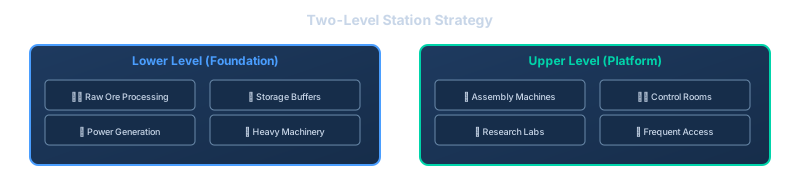
This split keeps your heavy industry below and your fiddly production above. When you’re tweaking assembler recipes, you’re not climbing over power plants to get there.
3. Throughput Thinking
This is where I kept messing up. A belt can only move so much material per second. When you stack five assemblers pulling from the same line, the last one starves.
The fix: Use splitters to balance flow, and insert buffer storage at key points:

That buffer absorbs demand spikes. Without it, your production line stalls every time you add a new consumer.
4. Expansion Planning
Every time I thought “this is plenty of space,” I was wrong. Here’s what I learned:
- Leave 3-4 empty tiles between major production blocks
- Don’t build against the station edge — you’ll unlock expansions that make that space useful later
- Reserve space for power — your power needs will triple by mid-game
- Plan for freighter docks early — they need specific clearances
Layout Patterns That Work
Pattern 1: Linear Production Chain
Best for: Single-product lines like “Iron Ore → Iron Plate → Steel”

Simple, easy to extend, hard to mess up. Use this for your first station.
Pattern 2: Hub-and-Spoke
Best for: Central processing with multiple inputs
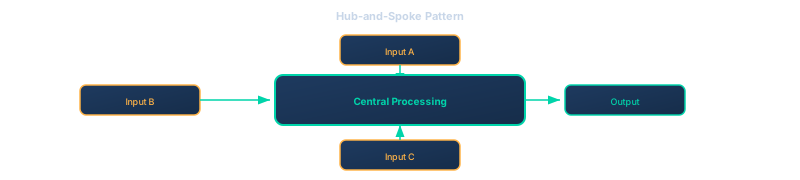
Good for your main station where everything converges. The hub handles common operations, spokes feed in raw materials.
Pattern 3: Modular Blocks
Best for: Mid-to-late game when you’re repeating similar setups
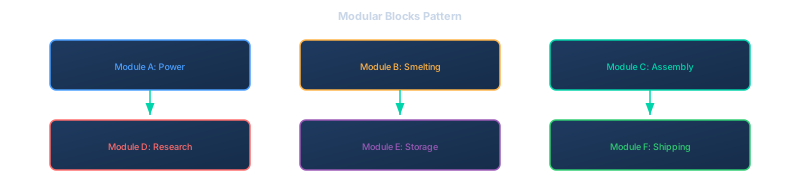
Each module is self-contained with its own inputs/outputs. You can copy-paste working modules to new stations.
Common Layout Mistakes
Mistake 1: The “Compact” Trap
I tried to squeeze everything into minimum space. Result: To expand anything, I had to tear down three other things.
The reality: Compact layouts only work if you know exactly what you need. You don’t. Leave space.
Mistake 2: Ignoring Belt Direction
Belts have a direction. If you set up your main bus going the wrong way, every new addition fights against the flow.
Fix: Before placing anything, trace where materials need to go. Set belt direction to match that flow.
Mistake 3: Cross-Feeding Chaos
When you need material from line B on line A, it’s tempting to just run a belt across. Do this ten times and you can’t see anything.
Better approach: Either:
- Extend your main bus to include that material
- Build a dedicated parallel line
- Use the second level for cross-connections
Mistake 4: Blocking Expansion Points
Certain station upgrades need clear space. I kept building right where the next expansion would connect.
Check before building: Look at your station’s expansion direction. Keep those edges clear.
Advanced Tips & Debugging▼
Practical Tips From Experience
Build a test line first. Before committing to a big layout, build a small version. Does throughput work? Are buffers in the right places? Can you actually reach everything? Scale up once you’ve proven it works.
Use landmarks. Pick visual reference points: “Smelting happens in the northeast corner,” “Power generation stays on the west wall.” These mental anchors keep you from spreading randomly.
Screenshot working layouts. When you build something that works well, screenshot it. You’ll want to recreate it at your next station.
Plan power early. Power buildings are big — they need fuel delivery lines, space for expansion, and grid connection. Don’t squeeze them in as an afterthought.
Visual Debugging
When something’s not working:
- Follow the belt — Walk from source to consumer, watch where items stop
- Check inserter coverage — Is every machine actually connected?
- Verify belt direction — Items flowing the right way?
- Look for crossovers — Two belts feeding each other creates a loop
Most problems are visible if you just walk the line.
Balancing Multiple Outputs
When several machines feed one belt:

Splitters ensure each machine gets equal input. Mergers combine outputs evenly. Without them, one machine hogs all the resources.
Specific Layouts: Power, Research & Storage▼
Power Generation Layout
Power buildings need fuel input line, connection to grid, and space for expansion.

Keep all power in one area. Don’t scatter generators around your station.
Research Layout
Research labs need research items input, power, and easy access (you’ll check them often).

Put research near your main working area. You’ll be checking progress frequently.
Storage Hub Layout
Central storage should be accessible from all directions, near high-traffic areas, and expandable.

Everyone routes through central storage. Keep it central.
Late Game Planning & FAQ▼
Late Game Transition
Your early game layout won’t work for late game. Plan for the transition.
What Changes Late Game
- Production volume: You’ll need 10x what you have now
- Material variety: Late game needs materials you haven’t unlocked yet
- Power demand: Skyrockets with advanced machines
- Station size: You’ll expand to multiple zones
Future-Proofing Your Layout
Do leave:
- Wide paths that can become belt highways
- Empty zones marked for future production
- Power grid that can extend
Don’t lock in:
- Permanent structures blocking expansion directions
- Main bus in the center (keep it on an edge)
- Non-modular builds you can’t replicate elsewhere
When to Rebuild
Rebuild early if:
- Your layout is actively slowing you down
- You’re spending more time fighting it than working with it
- You can’t add something you obviously need
Don’t rebuild if:
- It’s ugly but functional
- You’re just optimizing prematurely
- The rebuild would take longer than working around it
FAQ
Q: Should I build everything on one level first? A: For your first station, yes. Keep it simple. Once you understand the basics, start using both levels deliberately.
Q: How much space should I leave between buildings? A: At minimum, leave one tile for walking. For production areas, leave 2-3 tiles so you can add splitters/buffers later.
Q: What’s the biggest layout mistake you see? A: Building without thinking about where the NEXT thing goes. Every building should have a reason for its position, including “this space is reserved for future expansion.”
Q: Should I tear down and rebuild when you realize your layout is bad? A: If it’s early game, yes. An hour of rebuilding saves ten hours of fighting a bad layout. Late game, build a new station with your improved design and migrate production.
Q: How do I handle multiple stations? A: Design each for a purpose — Station 1 for basic processing and research, Station 2 for advanced materials, Station 3 for ship building and freight operations. Use freighters to move materials between them.
Q: Where do I build a second station? A: Research the Telescope to scan nearby planets. Look for planets with rare minerals (silicon, uranium). That’s where you build next.
Related Guides
- Beginner Mistakes to Avoid — More ways to not sabotage yourself
- Freighter and Mining Guide — Moving materials between stations
- Pipe Bottleneck Fix — When your layout causes flow problems
- Research Order Guide — What to unlock to enable better layouts