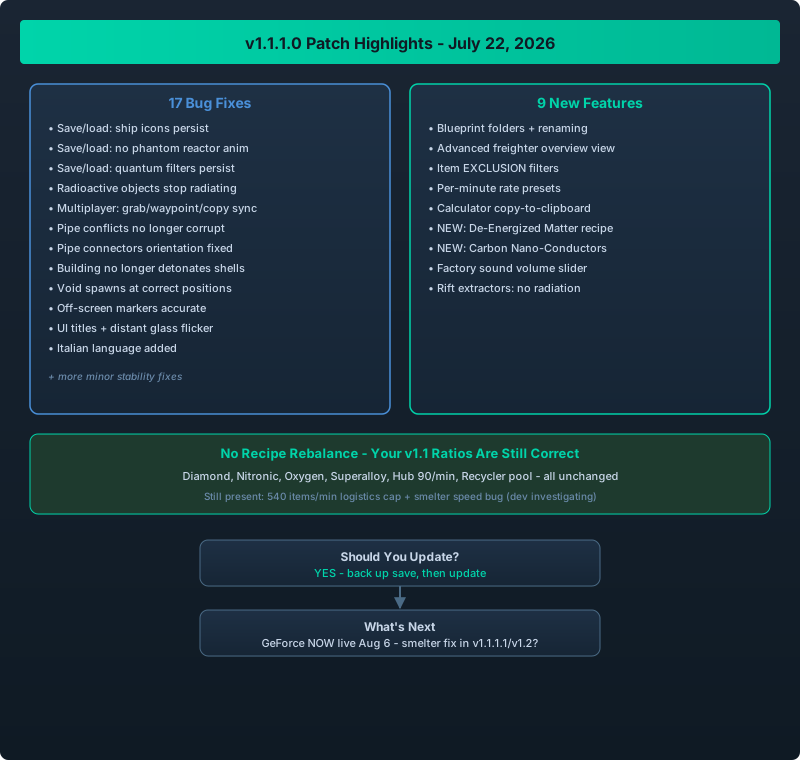
v1.1.1.0 at a glance: 17 fixes, 9 new features, and the two new alternate recipes
The Update That Wasn’t Announced Loudly
On July 22, Trickjump Games shipped v1.1.1.0 – a stability and quality-of-life patch that most players barely noticed because there was no big new feature splash. But this update matters more than it looks: it fixed 17 bugs that were actively hurting late-game saves, and quietly added 9 features that change how you organize blueprints, monitor freighters, and filter storage.
If you last touched the game during the v1.1.0 launch window (late June), your build is missing some genuinely useful tools. Here is every change, grouped by what actually affects you.
v1.1.1.0 is a “fix your save and give you better tools” patch. The headline fixes target save/load corruption (missing ship icons, phantom reactor animations, radioactive objects), multiplayer desync bugs, and pipe placement quirks. The headline features are blueprint folders, an advanced freighter view, item exclusion filters, and two new alternate recipes (De-Energized Matter and Carbon Nano-Conductors). No recipe values were rebalanced – your v1.1 factory ratios are still correct.
The 17 Bug Fixes, Categorized
Save / Load Fixes (the ones that save your save)
| Fix | Why it matters |
|---|---|
| Controlled ship icons no longer disappear after loading a save | Your ship list and map markers stay intact |
| Radioactive objects no longer radiate after a reload | Containment builds stop leaking “ghost” radiation |
| Antimatter reactors no longer replay their startup animation after load | No more phantom power flickers and audio stutter |
| Quantum storage filters now persist correctly | Filter settings survive restarts |
These four fixes alone are worth the update. If you had a late-game save with “missing” ships or weird radiation readings, reload it on v1.1.1.0 before rebuilding anything – the problem was the game, not your design.
Multiplayer Fixes
- Grabbing objects in co-op no longer desyncs for the host
- Waypoint dragging works correctly for non-host players
- Copying link settings between machines no longer fails for clients
Co-op groups that hit “I set it but it didn’t apply” issues should retest now. The v1.1.1.0 patch specifically addressed the client-side replication bugs.
Building & Placement Fixes
| Fix | Effect |
|---|---|
| Conflicting pipe layouts no longer corrupt on save | Complex pipe networks survive reloads |
| Pipe connectors no longer rotate upside-down | Directional builds behave predictably |
| Placing buildings no longer detonates nearby projectiles | No more random explosion deaths during construction |
| Voids spawn at correct positions | Exploration markers are accurate again |
Visual & UI Fixes
- Off-screen markers now point in the correct direction
- UI titles display properly in all languages
- Distant glass panels no longer flicker
- Italian language support added
The 9 New Features
1. Blueprint Folders & Renaming
You can now organize blueprints into folders and rename any blueprint. This is a huge quality-of-life win if you have 30+ saved blueprints. See the full workflow in our Blueprint Folder Management Guide.
2. Advanced Freighter View
The freighter overview panel now shows per-ship cargo, route, and capacity at a glance. This turns fleet monitoring from “click each ship” into “scan one screen.” Details in our Freighter Overview & Logistics Monitoring Guide.
3. Item “Exclusion” Filters
Storage and logistics buildings now support exclusion filters – you can mark items to keep out instead of only whitelisting what goes in. This is the tool for “everything except junk” setups. Full patterns in our Item Exclusion Filters Guide.
4. Per-Minute Rate Presets
Building efficiency can now be set automatically by items-per-minute rate, instead of percentage sliders. If you think in throughput rather than percentages, this saves real time.
5. Calculator Copy-to-Clipboard
The in-game calculator now has a copy button. Small, but it ends the “screenshot the math” workflow.
6. Two New Alternate Recipes
- De-Energized Matter – a new alternate recipe that changes how you convert exotic matter
- Carbon Nano-Conductors – a new circuit-tier recipe that reduces dependency on rare conductors
Both are covered in depth in their own guides (De-Energized Matter and Carbon Nano-Conductors).
7. Italian Language
Full Italian localization. (Not useful for most of our readers, but it signals the team is still actively localizing.)
8. Factory Sound Sliders
Machine audio now has its own volume slider, separate from music and UI. If your smelter array was drowning out everything, this is the fix.
9. Extractors on Quantum Rifts (No More Radiation)
Building extractors on quantum rifts no longer causes radiation. This unlocks safe harvesting of rift resources without containment – see our Quantum Rift Extractor Guide.
What Was NOT Changed
| Area | Status |
|---|---|
| Recipe input/output values | Unchanged since v1.1.0 |
| Hub throughput (90/min) | Unchanged |
| Recycler Points pool | Unchanged |
| Station level curve | Unchanged |
| 540 output cap on logistics | Still present (see workarounds below) |
Your v1.1-era factory ratios remain correct. The v1.1 Recipe Changes Guide is still the source of truth for recipe numbers.
The 540 items/min logistics cap and the smelter speed bug (smelters occasionally refusing to run at full speed) are both still present in v1.1.1.0. The developer has acknowledged the smelter issue and asked for save files. Until a hotfix lands, see our Late-Game Logistics Balance Guide and Smelter Speed Troubleshooting Guide for practical workarounds.
Should You Update?
Yes, without hesitation. v1.1.1.0 fixes save-corruption-adjacent bugs, improves co-op reliability, and adds tools that make blueprint management and fleet monitoring dramatically easier. There are no known regressions from this patch – no recipe changes, no nerfs, no progression resets.
One caveat: if you are mid-way through a 100-hour save and everything is stable, update anyway, but back up your save first. Our Save Backup Guide has the safe procedure. The save/load fixes in this patch are exactly the kind of change that works best on a fresh load anyway.
What’s Next
The developer’s public roadmap continues: GeForce NOW support went live on August 6 (cloud streaming, not a game update), and the team is actively collecting save files for the smelter speed issue. If you hit it, send yours in – the fix will likely land in v1.1.1.1 or v1.2.