You Can See the Other Planet — But You Can’t Reach It
There it is. A glowing asteroid rich with Tungsten, just sitting in the next sector over. Your freighters take 4 minutes to fly there and back. You could set up a mining outpost, but the logistics are painful.
Or you could punch a hole through spacetime and link the two locations instantly.
Wormhole Terminals are the most powerful logistics tool in Outworld Station — and the most misunderstood. I see the same questions constantly: “How do wormhole channels work?” “Why are my inventories not syncing?” “Can I connect more than two stations?” The in-game tutorial covers none of this.
This guide goes deeper than our Automation Guide’s wormhole section. We cover channel configuration, inventory pairing across wormholes, multi-station networks, and the mistakes that will cost you hours.
The Short Version
Build a Wormhole Generator at each location. Set both to the same channel number. Their inventories sync automatically. Use Inventory Pairing across the wormhole link for hands-off interplanetary logistics. Unlock at Station Level 6+ research.
How Wormhole Channels Work▼
The Basics
Each Wormhole Generator has a channel number. When two generators share the same channel number, they link. Their internal inventories merge — items placed in one generator’s storage appear in the other’s.
Think of it like a portal. Anything that goes in one side comes out the other.
Channel Rules
- Same channel = linked. Generators on Channel 1 sync with all other generators on Channel 1.
- Different channel = separate. Channel 1 and Channel 2 are completely independent networks.
- Up to 4 generators per channel. You can link more than two locations on the same channel.
- Channel range is unlimited. Distance between generators does not matter. Same planet or across the galaxy — the link is instant.
What Syncs and What Doesn’t
| Syncs Across Wormhole | Does NOT Sync |
|---|---|
| Items in generator storage | Power grid |
| Inventory Pairing connections | Building status |
| Connector flow | Production queue |
| Storage Container contents (if paired) | Construction progress |
Key Insight
The wormhole link is instant and bidirectional. Items placed in Generator A's storage immediately appear in Generator B's storage. There is no travel time, no shipping delay, no capacity limit on the link itself. The only bottleneck is how fast your Connectors can push items into and pull items out of the generator's storage.
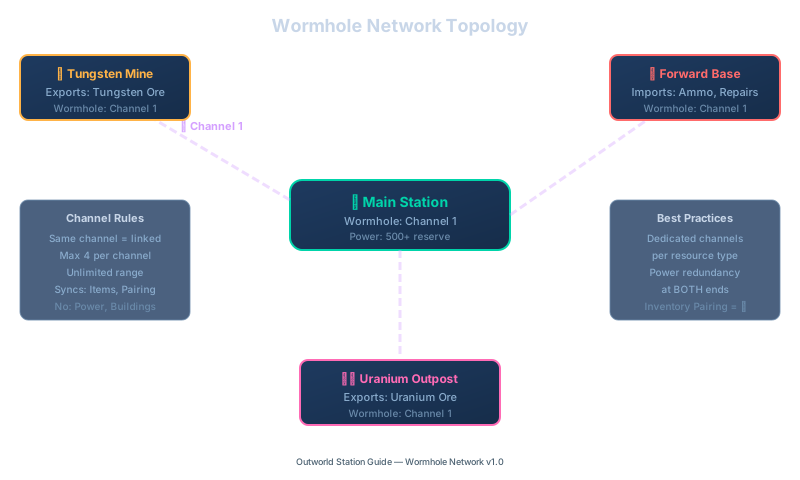
Wormhole network topology showing multiple remote stations linked to the main station through Channel 1 with rules and best practices
Setting Up Your First Wormhole Link▼
Prerequisites
| Item | Why | Unlock |
|---|---|---|
| Wormhole Generator | The terminal building | Station Level 6 research |
| Stable power (15+/sec per generator) | Wormholes drain power continuously | Any power source |
| Two locations that need linking | Obvious but worth stating | N/A |
| Connectors + Storage Containers | To feed and receive items | Basic Logistics |
Step-by-Step
1. Build Generator A at your main station
Place it near your central Storage area. Connect a Storage Container to it with a Connector. Set the channel to 1.
2. Build Generator B at the remote location
Fly to the remote planet/asteroid. Place the second Wormhole Generator. Set the channel to 1. They should link immediately — you’ll see the generator’s UI show “Connected: 1 peer.”
3. Connect the remote side
At the remote location:
- Build a Miner on the ore vein
- Connector: Miner → Storage Container → Wormhole Generator
4. Connect the main station side
At the main station:
- Connector: Wormhole Generator → Buffer Storage → Smelter/Processing
5. Set up Inventory Pairing (optional but recommended)
Use Inventory Pairing between the remote Miner’s output container and the Wormhole Generator’s storage. This automates the push — mined ore goes directly into the wormhole.
Then set up Inventory Pairing on the main station side between the Generator’s storage and your processing buffer. Items that arrive through the wormhole are automatically pulled out.
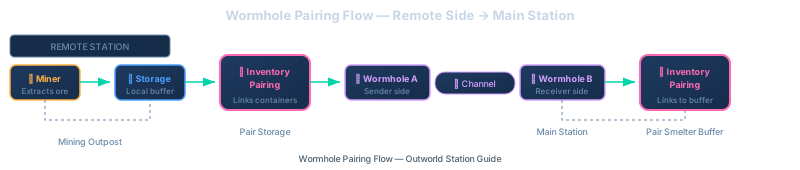
Wormhole inventory pairing flow from remote miner through paired storage across wormhole to main station
Power Warning
Wormhole Generators draw power continuously while linked. If the power at either end drops, the link breaks and items stop syncing. The generators stay built but go offline until power is restored.
Always have power redundancy at both ends. A single Small Reactor or 8 Solar Panels per generator is the minimum.
Freighter vs. Wormhole
Wormholes are better than freighters for high-priority, high-throughput resources. But they cost more power and the generators are expensive to build. Use wormholes for [Superalloy](/guides/superalloy-guide/) ingredients, antimatter fuel, and defense supplies. Use [freighters](/guides/freighter-mining-guide/) for bulk low-value stuff like Iron and Silicon.
Multi-Station Networks▼
You can connect more than two locations. Here are the patterns that work.
The Star Network (Recommended)

Planet-to-planet wormhole chain linking stations through dedicated channels
Each remote location connects to the main station on its own channel. The main station has 4 Wormhole Generators, one per channel.
Why separate channels? So each resource type has its own dedicated pipeline. No mixing, no overflow from one resource clogging another’s link.
The Daisy Chain (Not Recommended)
Planet-to-planet wormhole chain linking stations through dedicated channels
All on the same channel. Items from Planet A pass through Planet B’s storage on their way to the main station.
Problem: Planet B’s inventory fills up with items meant for the main station. Connectors at Planet B waste bandwidth pushing items through that aren’t even for Planet B.
Use only if you genuinely want all locations sharing a single inventory pool.
The Ring Network
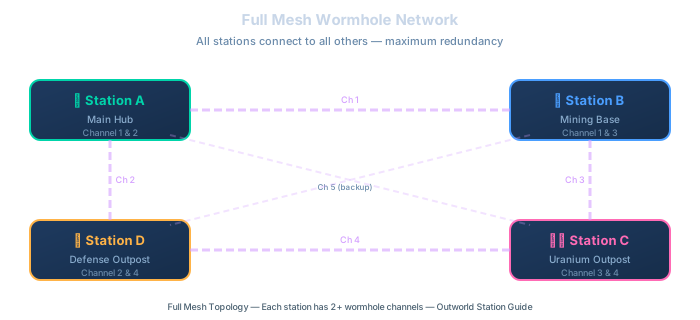
Full mesh wormhole network with 4 interconnected stations
Four stations, each with 2 generators on different channels. Every station can reach every other station in one hop.
Use case: Four equal production stations that need to share resources bidirectionally.
Channel Planning
Write down your channel assignments before building. Once you have 3+ generators on the same channel, keeping track of what links where gets confusing fast. I use a simple doc: "Channel 1 = Iron, Channel 2 = Tungsten, Channel 3 = Superalloy components, Channel 4 = Defense supplies."
Advanced Wormhole Techniques▼
Priority Routing Across Wormholes
Set the receiving Storage Container at the main station to Priority Output mode. This makes it grab items from the wormhole as fast as the Connector allows, preventing the generator’s storage from filling up and blocking the link.
Wormhole as a Defense Supply Line
Connect your Munitions Factory output to a Wormhole Generator. At each remote outpost, set the generator’s output to feed the local Missile Turret ammo supply. Your central factory automatically keeps all outposts armed.
Emergency Resource Transfer
Stuck on a remote planet and need a specific item? Put it in your Wormhole Generator’s storage at the main station, and it appears at the remote generator instantly. No freighter wait time.
Wormhole Bandwidth Management
The wormhole link itself has no bandwidth limit. But the Connectors feeding into and out of the generators do. If your Superalloy Forge needs 20 Tungsten/sec and your Connector can only push 10/sec into the generator, that’s your bottleneck — not the wormhole.
Fix: Use multiple Connectors in parallel feeding the generator. Or use Mk4 Connectors for maximum throughput.
The Two-Channel Split
If you need to send AND receive different items between two locations, use two separate channels:
- Channel 1: Remote → Main (ore flowing in)
- Channel 2: Main → Remote (supplies flowing out)
This prevents items from both directions competing for the same generator’s storage space.
Troubleshooting Wormhole Problems▼
Generators Won’t Link
Cause: Different channel numbers, or one generator has no power.
Fix: Double-check the channel number on both generators. Verify both have power. The UI should show “Connected: 1 peer.” Also check your Connector setup — if a Mk1 pipe is feeding the generator’s fuel input while a Mk3 is needed, the link will fail silently.
Items Not Appearing on the Other Side
Cause: The generator’s storage is full on the receiving end. Items can’t sync if there’s nowhere for them to go.
Fix: Add a Connector pulling items out of the receiving generator. Or add a Storage Container on the receiving side with Inventory Pairing.
Link Keeps Breaking
Cause: Power instability at either end.
Fix: Add battery backup or a dedicated Small Reactor to each generator. Wormholes are power-hungry — if your grid is at 90%+, the wormhole will be the first thing to drop during a power spike.
Items Arriving at the Wrong Location
Cause: Two generators on the same channel that you forgot about.
Fix: Check all generators on the shared channel. Make sure only the intended locations are linked.
Wormhole + Freighter Conflict
Cause: Both a wormhole and a freighter route are delivering the same resource to the same location. The Storage Container fills up, the freighter can’t unload, and the wormhole link backs up.
Fix: Use wormholes OR freighters for a given resource — not both. Or use separate storage containers for each delivery method.
Quick Reference — Wormhole Cheat Sheet▼
Setup Checklist
- Build Wormhole Generator at Location A
- Build Wormhole Generator at Location B
- Set both to the same channel
- Verify "Connected: 1 peer" in UI
- Connect input/output to storage
- Set up Inventory Pairing
- Add power redundancy at both ends
Channel Planning
- 1 channel per resource type (recommended)
- Max 4 generators per channel
- Document your channel assignments
- Use 2 channels for bidirectional flow
- Keep defense supplies on a dedicated channel
Wormhole mechanics verified in version 1.0.0.2. Channel limits and power draw may change with future updates.
FAQ
Q: What wormhole level do I need?
Lv1 works fine early game (5 units/sec). Don’t wait for Lv3 — get Lv1 up first to connect your first resource planet.